Company Audit Trail & Compliance
Maintaining data integrity and security is essential for construction and contracting firms handling multi-crore contracts. Planmaster includes an enterprise Audit Logs system (/audit) that records every significant action taken within your company workspace.
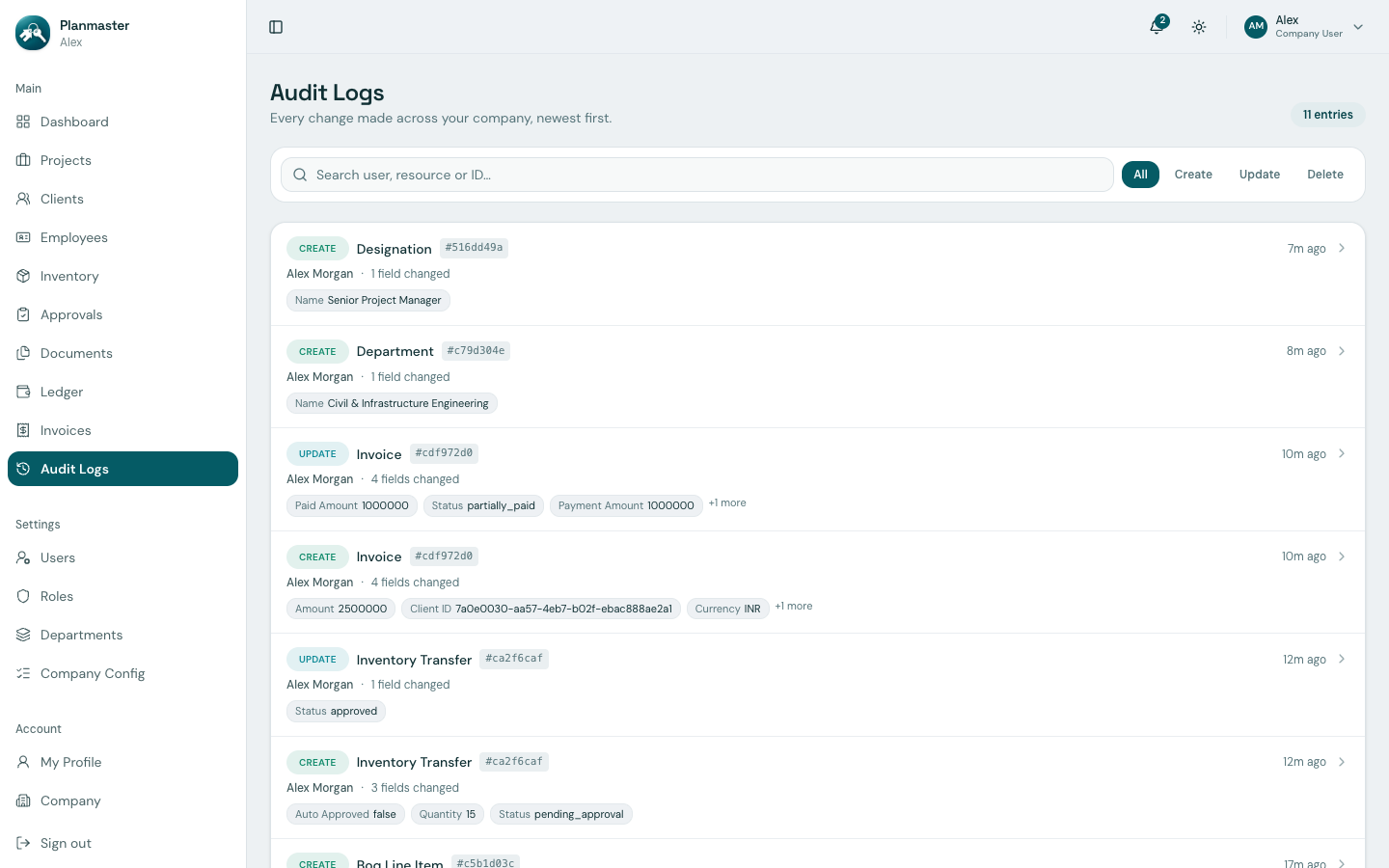
What is Recorded in the Audit Trail?
Whenever a team member logs in, creates a contract, modifies a Bill of Quantities quantity, approves a material transfer, or records an expense, Planmaster automatically logs:
- Timestamp: Exact date and time (with second-level precision) when the action occurred.
- Actor (User): The full name and email of the colleague who performed the action.
- Action Type: Filter the log by
Create,Update, orDelete(a material transfer approval or rejection is recorded as anUpdateon that transfer request). - Resource / Entity: The affected module and record (e.g.,
invoice #cdf972d0,department #c79d304e). - Change Details / Diff: Exactly what field changed, showing the number of fields changed and their new values (e.g., an invoice payment showing
paid amount,status, andpayment amount).
How to Inspect Audit Logs
- Click Audit Logs in the left sidebar menu (under the Main section).
- Browse through chronological entries (newest first) or use the search bar to find actions by user, resource, or record ID.
- Use the All / Create / Update / Delete filter buttons to narrow down the entries shown.
Benefits for Quality & Financial Audits
- Dispute Resolution: If a subcontractor claims a BOQ line was altered without authorization, the audit trail shows precisely who edited the quantity, when the edit occurred, and the original agreed value.
- Statutory & Tax Compliance: Financial auditors and tax authorities can verify that recorded invoice payments and ledger expenses were authenticated by legitimate company staff.
- Internal Security: Prevents unauthorized deletion or retroactive changes to closed projects and settled commercial contracts.