Daily Progress Reports (DPR)
On a construction site, tracking daily progress is vital. Whether verifying that concrete was poured, logging weather delays, or recording site worker counts, Planmaster's Daily Updates feature gives site engineers a structured way to report site events every day.
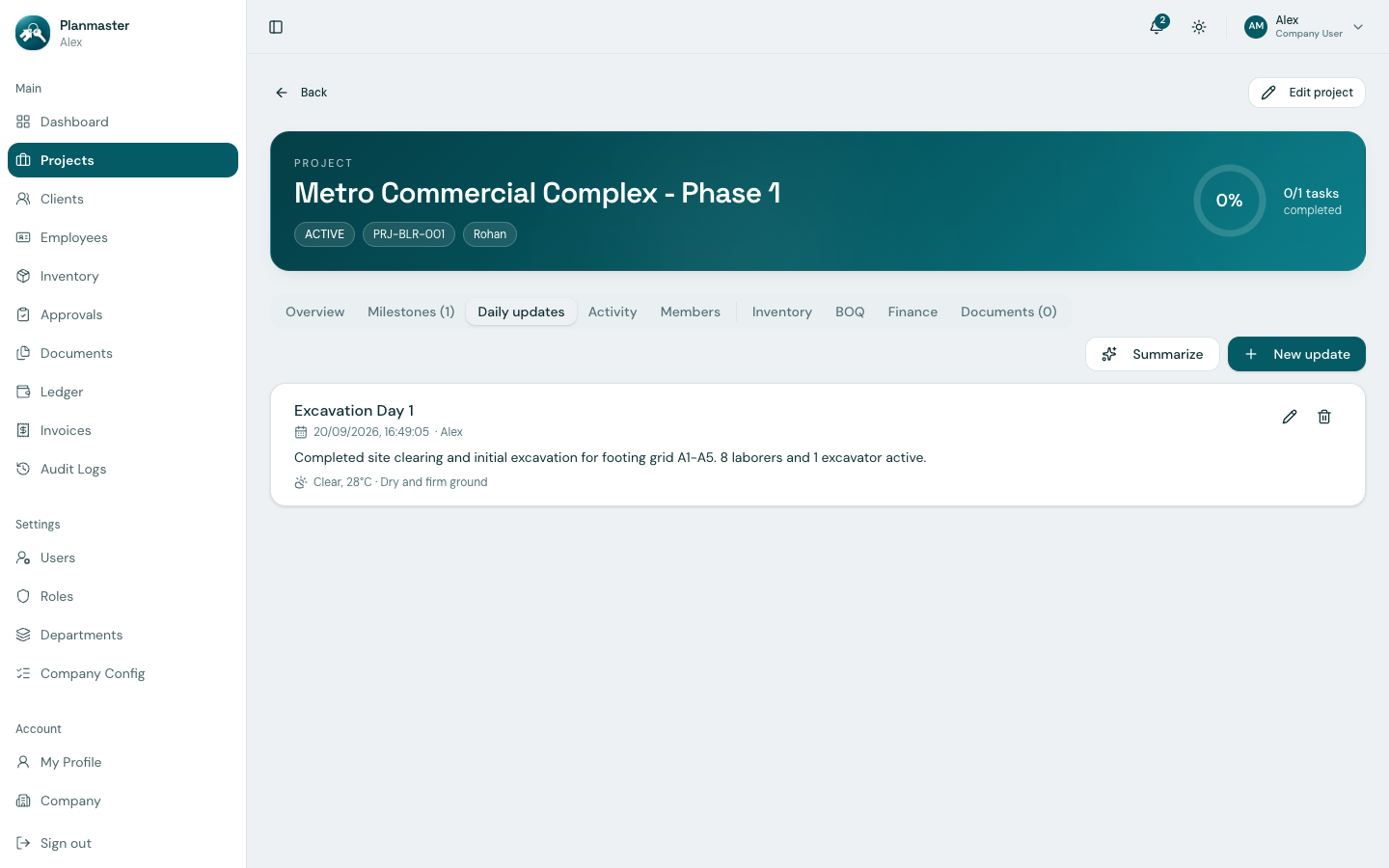
What is a Daily Progress Report (DPR)?
A Daily Progress Report is an on-site record submitted at the end of each shift. In Planmaster, each daily update includes:
- Title: An optional short label for the entry (e.g., Excavation Day 1).
- Update: A rich-text note (Bold, Italic, Underline, Link, and Numbered/Bullet list formatting) detailing progress across disciplines (excavation, rebar tying, shuttering, electrical conduit laying).
- Weather and Site conditions: Optional free-text fields for the day's weather and ground/access conditions.
- AI Summary: An integrated AI tool that analyzes recent site notes and creates an executive summary for project directors.
Each saved update is automatically timestamped with the author's name and the date/time it was posted — there is no separate date field to fill in.
How to Create a Daily Update (Step-by-Step)
- Open your project from Projects in the left sidebar.
- Click the Daily updates tab across the top navigation bar.
- Click the New update button in the top action bar.
- Complete the daily log form:
- Title: An optional short label for the entry.
- Update: Write your progress notes using the rich-text editor.
- Weather: Optional free-text (e.g., Clear, 28°C).
- Site conditions: Optional free-text (e.g., Dry and firm ground).
- Click Save.
Your daily log is immediately saved to the project's permanent timeline!
Using the AI "Summarize" Feature
Writing daily reports for clients and senior management can take hours. Planmaster includes a built-in Summarize button powered by AI to save time:
- On the Daily updates tab, click the Summarize button next to New update.
- Planmaster reads the recent site notes and weather/site-condition details.
- It automatically generates a concise, professional briefing ready for client emails or weekly management reviews.
Helpful for Site Supervisors
Site engineers don't need to spend time formatting formal memos. Simply log bullet points of daily site achievements, and click Summarize to generate an executive report.
Why Daily Updates Protect Your Company
- Weather Delay Claims: If heavy monsoon rain stops concrete pouring for 4 days, your logged weather and site condition reports serve as timestamped evidence for contractual time extensions (EOT).
- Subcontractor Accountability: Record which subcontractor worked in which zone and whether their crew size met contractual commitments.
- Seamless Handover: If a site engineer is sick or takes leave, the replacement engineer can review recent daily updates and immediately understand site status.