Who Can Do What (User Roles)
In Planmaster, every team member has an assigned Role. Roles make sure site engineers, accountants, and storekeepers see the tools they need for their daily work, while safeguarding company-wide bank balances and sensitive contracts.
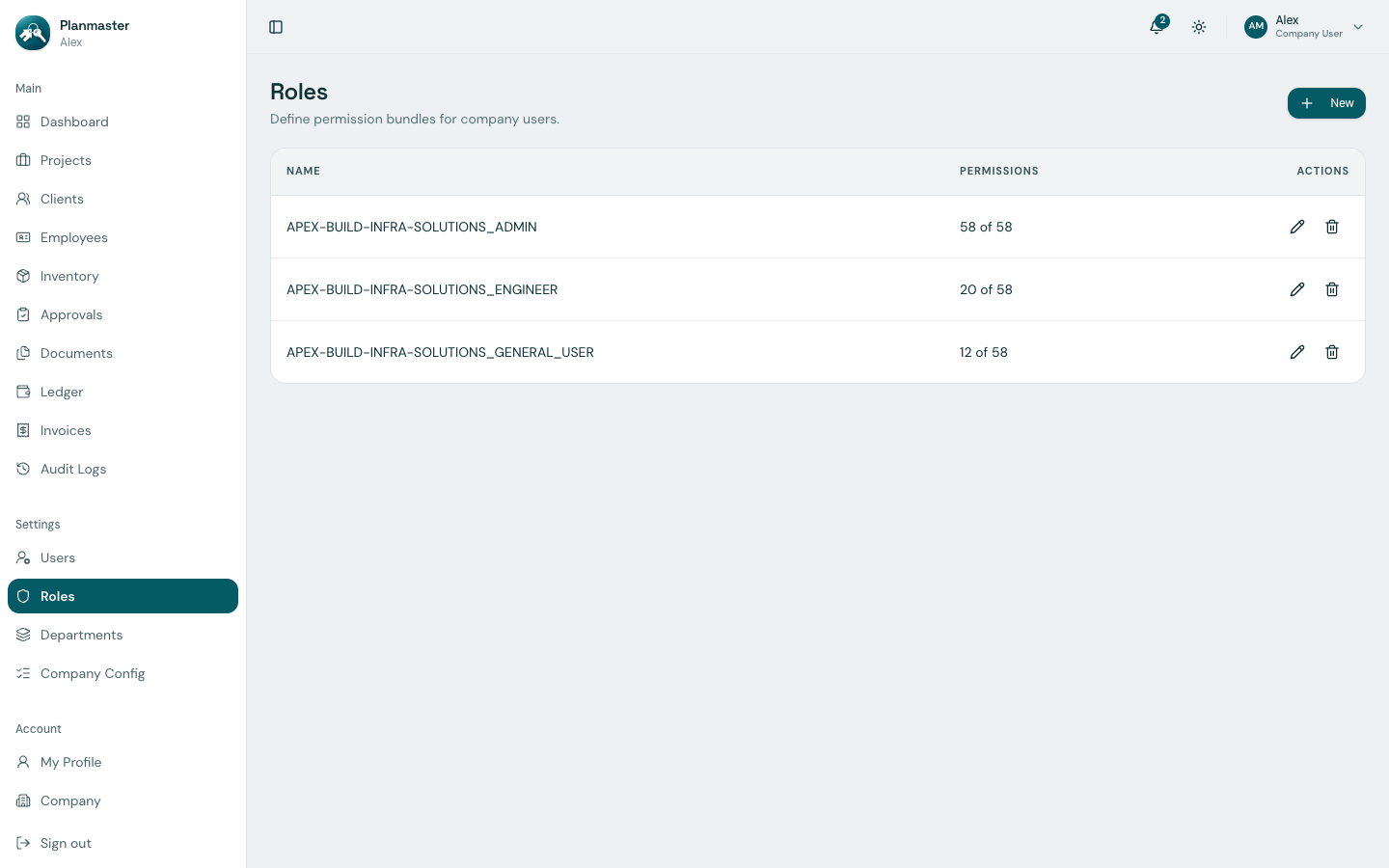
The 3 Standard Roles
When your company workspace is provisioned, Planmaster establishes 3 standard roles:
1. Company Administrator (ADMIN)
- Who it's for: Managing Directors, Partners, General Managers, and Operations Directors.
- What they can do:
- Invite team members, configure user seats, and customize security roles.
- Create projects, set budgets, and assign project in-charges.
- Issue client invoices, record bank payments, and inspect the general ledger.
- Review company audit logs, customize ID formats, and export company data bundles.
2. Project Engineer (ENGINEER)
- Who it's for: Senior Project Managers, Site In-charges, and Quantity Surveyors.
- What they can do:
- Add milestones, schedule daily site tasks, and assign work to supervisors.
- Submit Daily Progress Reports (DPRs) with weather and site ground conditions.
- Log executed quantities in the Bill of Quantities (BOQ).
- Requisition materials (rebar, cement, tools) from the central warehouse to the site.
- Upload construction drawings and structural blueprints.
3. General User / Site Supervisor (GENERAL_USER)
- Who it's for: Site Supervisors, Junior Field Technicians, and Foreman Coordinators.
- What they can do:
- Inspect daily tasks assigned to them across job sites.
- Check off quality subtasks and log timesheet work hours.
- Flag site blockers (e.g., equipment breakdowns or weather delays).
- View site drawings and project documents on mobile devices.
Quick Comparison: Operational Permissions Matrix
| Action / Capability | Company Admin | Project Engineer | Site Supervisor |
|---|---|---|---|
| View projects they belong to | ✅ Yes | ✅ Yes | ✅ Yes |
| Update task status & check off subtasks | ✅ Yes | ✅ Yes | ✅ Yes |
| Report & resolve site blockers | ✅ Yes | ✅ Yes | ✅ Yes |
| Submit Daily Progress Reports (DPRs) | ✅ Yes | ✅ Yes | ❌ No |
| Update BOQ executed quantities | ✅ Yes | ✅ Yes | ❌ No |
| Request warehouse materials | ✅ Yes | ✅ Yes | ❌ No |
| Approve warehouse material transfers | ✅ Yes | ❌ No | ❌ No |
| Issue client invoices | ✅ Yes | ❌ No | ❌ No |
| Record client payments | ✅ Yes | ❌ No | ❌ No |
| View & edit company expense ledger | ✅ Yes | ❌ No | ❌ No |
| Invite new employees & manage roles | ✅ Yes | ❌ No | ❌ No |
| Access Company Config & Audit Logs | ✅ Yes | ❌ No | ❌ No |
Creating Custom Roles
If your company has specialized staffing—such as a dedicated Storekeeper who only manages warehouse inventory and transfer approvals, or an Accounts Clerk who only enters expenses—Company Admins can build custom roles with specific permissions under Settings > Roles.
Learn more: Access Levels & Permissions (RBAC)